What Is AI-to-Human Handoff on WhatsApp?
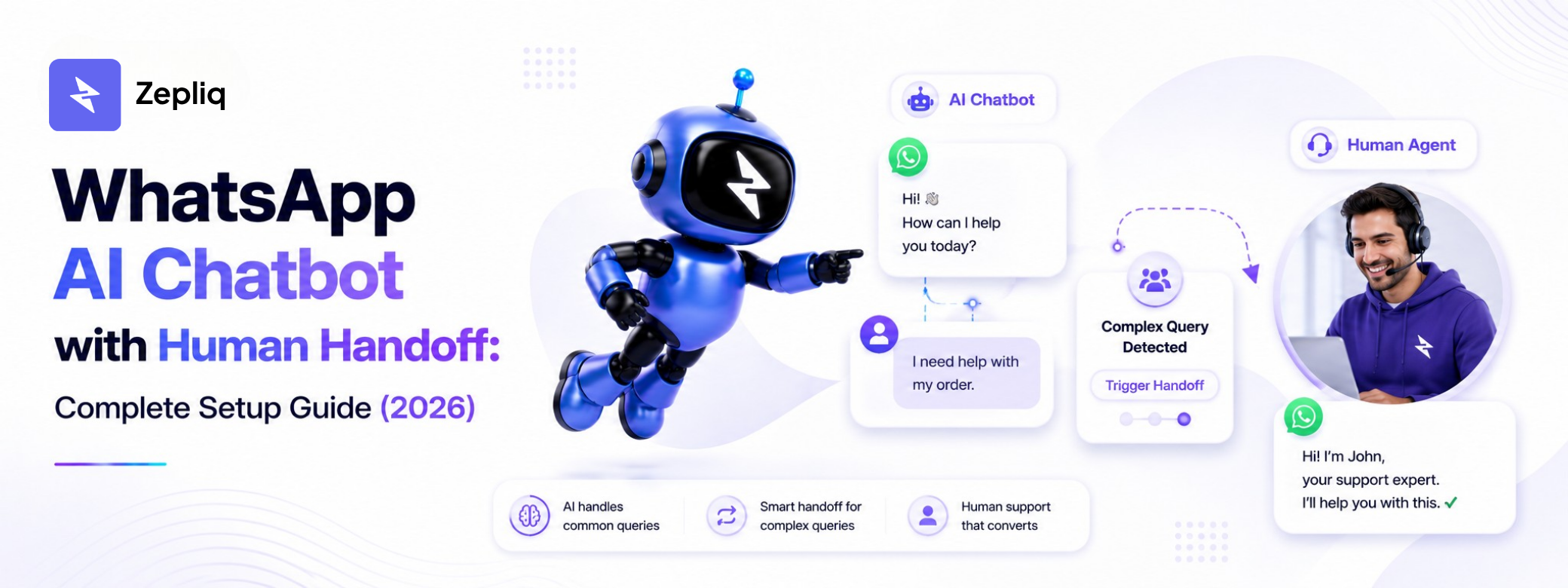
AI-to-human handoff is the process by which an AI chatbot transfers a conversation to a human agent. When the AI detects that a conversation requires human judgment, empathy, or authority, it passes the full conversation context to the appropriate team member.
On WhatsApp, this is especially important because customers expect fast, helpful responses. AI handles the majority of inquiries instantly. Humans handle conversations that require a personal touch, complex negotiation, or a decision outside the AI's capabilities.
The goal of a well-configured handoff system is that the customer never feels the transition. From their perspective, they are talking to a business that is always available, always informed, and always able to escalate appropriately.
When to Trigger Human Handoff on WhatsApp
Not every conversation needs a human agent. The key to an efficient handoff system is defining clear triggers — the signals that tell the AI it is time to pass the conversation to a person.
The most common handoff triggers fall into four categories: customer request, AI confidence threshold, conversation value, and sentiment detection.
- Customer requests a human: "I want to talk to a real person", "Can I speak to someone?"
- AI cannot answer confidently: complex returns, legal questions, custom quotes
- High-value signal: enterprise inquiry, large order, VIP customer detected
- Negative sentiment detected: customer is frustrated, upset, or threatening to leave
- Payment or refund issues that require account access or authorization
- Conversation has exceeded a defined number of unanswered AI messages
How to Configure AI-to-Human Handoff in Zepliq
Zepliq's handoff system lets you define triggers, assign agents, and set notification rules. When a handoff is triggered, the assigned agent receives an alert with full conversation context so they can respond without asking the customer to repeat themselves.
The setup takes less than 20 minutes and can be refined over time as you observe which conversations consistently require human attention.
- Open the Automation panel in Zepliq and navigate to Handoff Rules
- Define your triggers: keywords, sentiment, confidence threshold, or manual request
- Assign agents or teams to receive handoff notifications
- Set a response SLA so customers know a human is joining the conversation
- Enable AI pause mode so the bot stops replying during human-handled conversations
- Set re-engagement rules to return conversation to AI after the human closes it
Best Practices for Smooth AI-to-Human WhatsApp Handoffs
The difference between a good handoff and a bad one is context. When a human agent receives a handoff without the full conversation history, the customer has to repeat themselves. That repetition destroys trust and signals that the system is fragmented.
Zepliq ensures agents always receive full conversation context before responding. But there are additional practices that improve the experience on both sides.
- Send a transition message: "Let me connect you with our team — they'll be with you shortly."
- Set realistic response time expectations in the transition message
- Train agents to read the full AI conversation before typing their first reply
- Keep the WhatsApp channel open — do not redirect customers to email or phone
- After resolution, return to AI for follow-up satisfaction checks or upsell messages
- Review handoff transcripts weekly to identify topics AI can be trained to handle
Frequently Asked Questions
Does the customer know when a handoff happens?
You can configure Zepliq to send a brief transition message when a human agent takes over. Most businesses send something like "Connecting you with our team now." This sets expectations without disrupting the conversation.
What if no agent is available when a handoff is triggered?
Zepliq can queue the handoff and send the customer an estimated wait time. The AI continues to handle basic questions while the queue is active, so the customer is never left without a response.
Can I see which conversations were handed off and why?
Yes. The Zepliq dashboard shows all handoff events, the trigger that caused each one, the agent who handled it, and the outcome. This data helps you refine AI training over time.
Can I set different handoff rules for different channels?
Yes. Zepliq lets you define separate handoff rules for WhatsApp and email. Each channel can have different triggers, agents, and response SLAs.
Build Your Customer Automation System with Zepliq
Zepliq helps growing brands automate WhatsApp, email, Shopify, WooCommerce, and sales pipeline workflows from one dashboard.
Use this guide as a starting point, then connect your real customer conversations so your team can reply faster, follow up better, and build a brand customers remember.
Start Your Free 14-Day Trial
No credit card required. Connect your channels and launch your first automation workflow in minutes.
- No credit card required
- WhatsApp, email, and store automation
- Built for sales and support teams